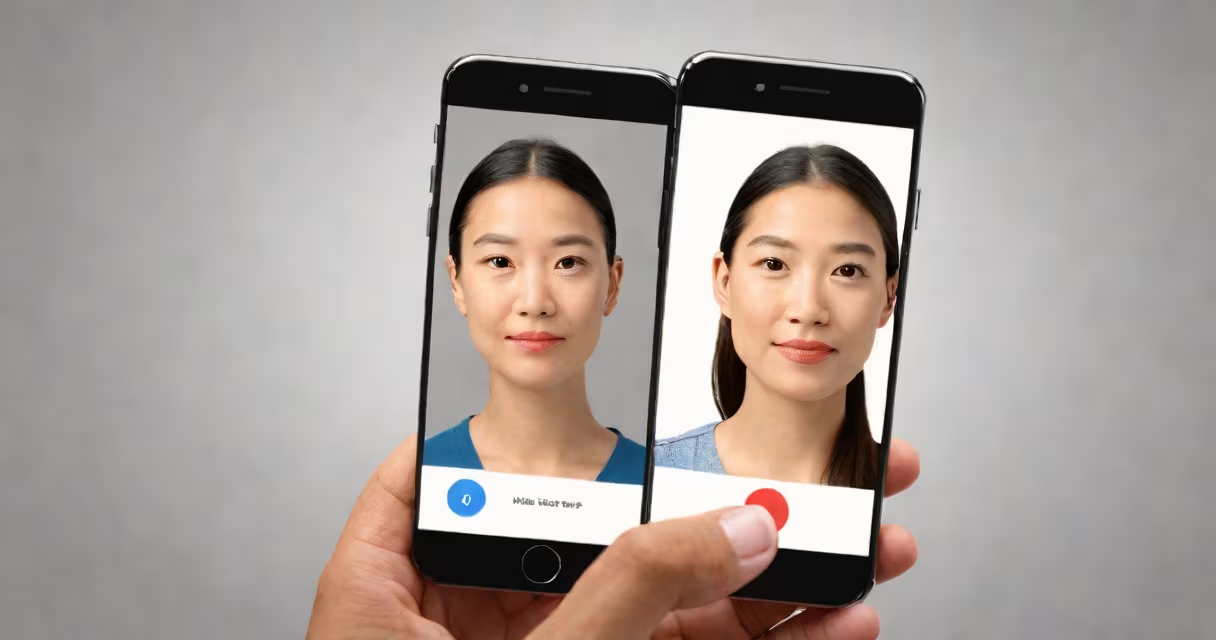
An id photo maker is a digital tool that automatically generates official-compliant identification photos from a single uploaded image, adjusting size, pose, background, and lighting to meet government standards such as those set by the U.S. Department of State and the International Civil Aviation Organization (ICAO).
These tools process a user's photo through algorithms that detect facial features, crop the image to precise dimensions, and replace the background with solid white or off-white, as required for most IDs. The output is a ready-to-submit image that meets specifications for size (typically 2x2 inches or 600x600 pixels), resolution (at least 600 dpi), and head position (eyes centered, face fully visible).
For example, the U.S. passport photo requirements mandate a neutral expression, full frontal view, and no shadows or glare. An id photo maker enforces these rules automatically, eliminating common rejection reasons like incorrect head tilt or background color.
When you upload a photo to an id photo maker, the system uses facial recognition software to locate key points: eyes, nose, mouth, and jawline. It then applies geometric transformations to align the face within the required frame, ensuring the head occupies 70-80% of the image area.
The tool adjusts contrast and brightness to eliminate dark shadows under the chin or around the eyes. It replaces the original background with a solid white or light gray, as specified by the issuing authority. Some systems also apply noise reduction and sharpening to improve clarity without introducing artifacts.
After processing, the tool exports the image in standard formats like JPEG or PNG, often with metadata tagged for compliance. Users can preview changes side-by-side before downloading.
Id photo makers fall into three categories based on access and functionality:
| Type | Access | Key Features | Best For |
|---|---|---|---|
| Web-based | Browser-only | Free tier, mobile-responsive, instant download | Quick, one-off use |
| Desktop apps | Downloaded software | Batch processing, advanced editing, offline use | Frequent users, high-volume needs |
| Mobile apps | Smartphone app | Camera integration, real-time preview, auto-crop | On-the-go creation, minimal setup |
Some platforms offer multi-country support. For instance, Passport Photo Online supports U.S., Canadian, EU, and UK passport standards, automatically selecting the correct dimensions and background color based on the selected country.
A lesser-known feature is compliance validation. Tools like ID Photo Creator check whether the image passes automated screening by government portals. This reduces submission failure rates-up to 30% of initial passport applications are rejected due to photo issues, according to the U.S. State Department.
Many assume that any photo editor can produce a valid id photo. This is incorrect. Standard editors lack the precision needed for regulatory compliance. A slight deviation in head position or background color can result in rejection.
Another misconception is that selfies work. Selfies often fail because they're taken at an angle, have uneven lighting, or include too much background. Id photo makers enforce strict guidelines that prevent these errors.
Some users believe free tools are equivalent to paid ones. Free versions may generate images that pass basic checks but lack audit trails or export options suitable for official submission. Paid tools often include version history and PDF reports for recordkeeping.
I used an id photo maker to renew my U.S. passport while traveling abroad. I took a selfie with my phone, uploaded it to a web-based tool, and selected "U.S. Passport" as the standard. The tool detected my face, removed the cluttered background, adjusted lighting, and resized the image to 600x600 pixels with a white background.
It flagged a minor issue: my left ear was partially obscured by hair. The tool suggested a quick edit or re-upload. After reshooting with the hair tucked behind the ear, the system confirmed compliance. I submitted the file directly via the U.S. State Department's online portal and received approval within 48 hours.
This process took less than ten minutes. Without the tool, I would have had to find a professional photographer or risk submitting a rejected application.
Government agencies rely on consistent visual data for identity verification. A standardized photo reduces fraud and improves processing speed. The ICAO recommends uniformity in ID photo format across nations to enable interoperability between border control systems.
Using an id photo maker ensures your image adheres to these global benchmarks. It eliminates guesswork and prevents costly delays. According to the U.S. Citizenship and Immigration Services, 15% of visa applications are delayed due to non-compliant photos, often because applicants misunderstand the rules.
For individuals without access to professional photography services, an id photo maker provides a reliable alternative. It's especially useful for travelers, job seekers, and immigrants going through complex documentation processes.
While some people still visit photo booths or print shops, digital tools offer faster turnaround, lower cost, and greater accessibility. A single $5 subscription can generate hundreds of compliant images.
Always verify the tool's compliance with current regulations. Standards change-some countries now require a minimum of 300 pixels per inch for digital submissions. Check the latest guidelines from the relevant authority before finalizing your image.